Stadium Tech Professionals: Time to take our 2015 stadium tech survey!

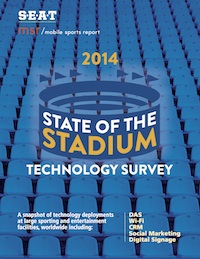
SOS14_thumbIf you are a stadium technology professional working for a school, team or stadium ownership group, it’s that time of year again — we need your participation to make our 2015 State of the Stadium Technology Survey our best yet! Now in its third year of existence, the “State of the Stadium” survey is the only independent, large-public-venue research that charts deployments of stadium technology like Wi-Fi, DAS, Digital Signage and Beaconing, and the use of digital sports marketing tools like CRM and social media. If you are part of a stadium operations group and know the answers, take the 2015 survey right now!

Before I get to a deeper explanation of the survey, a quick story: During last year’s survey season, I called a team IT exec that I knew well and asked why nobody from his organization had taken the survey. “Well, we don’t have Wi-Fi installed yet,” the exec said. “We’ll take the survey next year after it’s deployed.” I didn’t have the heart to say it at the time but — his take was completely the WRONG ANSWER. Why? Because this is an ANONYMOUS, AGGREGATED INFORMATION ONLY survey, which means that answers aren’t tied to any school, team or individual. Just look at last year’s survey to see how the answers are reported. That also means that all answers are completely confidential, and will not be sold, marketed or otherwise communicated in any way, shape or form outside of the ANONYMOUS TOTALS used in the survey report.

So since we’re trying to find out aggregate numbers — not individual details — it’s just as important for all of us to know who doesn’t have Wi-Fi as well as who does. So even if your school or team or stadium doesn’t have Wi-Fi — and may never have Wi-Fi — you should still TAKE THE SURVEY and add your organization’s information to the total. The more answers we get, the better the data are for everyone.

Survey time is time well spent

And that “everyone” thing leads me to my next point: If you’re a regular reader here you can and should consider the few minutes it takes to complete the survey as a small way of “paying back” to the rest of the members of this fine industry, many of whom make time for the interviews, visits and emails that form the core of all the excellent free content available here on the MSR site and through our long-form reports. We know you are busy, and that spending time answering a list of technology questions may not seem like the highest priority on your to-do list. But a little bit of your time can really help us all.

That’s because we also know, from our website statistics and from our report download numbers and just from conversations with many of you, that our audience of stadium technology professionals appreciates the honest, objective stories and analysis we provide. (We humbly thank you for making us a regular reading choice.) And now, by taking the survey, you can help make the site and our work even better, just by adding your team, school or stadium’s technology deployment information into the 2015 State of the Stadium Technology Survey. The more results we get, the better and more informative the survey becomes — and that’s something that’s truly a win-win situation for all involved.

Once again the State of the Stadium Technology Survey will be exclusively delivered first to the attendees of the SEAT Conference, being held this year in our home town of San Francisco, July 19-22. Production of this year’s survey is made possible by the sponsorship of Mobilitie, and through our partnership with the SEAT Consortium, owners and operators of the excellent SEAT event. All those who participate in the survey will receive a full digital copy of the final report, whether you attend the SEAT Conference or not.

Final reminder: This survey is meant to be taken ONLY by stadium technology professionals, executives, and team or school representatives who can accurately describe the deployments in place at their organization. It is NOT a survey to be taken by everyone, only by those who have a deployment to describe. If you have any questions about whether you should take the survey or not, send an email to me at kaps at mobilesportsreport.com. Thanks in advance for your time and participation!

Thinking out loud: Stadiums need better game-day online response teams

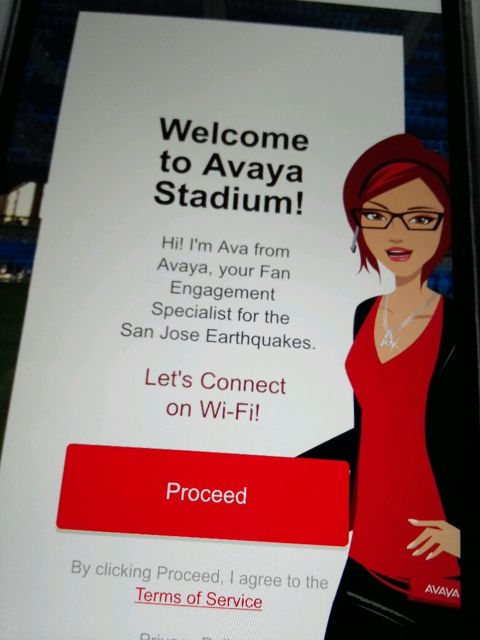
Avaya Stadium offers an online welcome

Avaya Stadium offers an online welcome

Maybe I just haven’t been to enough stadiums, but in the ones I visited over the last year I was struck by the fact that none of them seemed to have any kind of a place for live, updated game-day information where fans could find the kind of answers that might really improve their attendance experience.

In visiting various professional and top-level collegiate venues and interviewing representatives of other stadiums I continue to be impressed by the depth and breadth of technology deployments and of some apps that deliver advanced services, like Levi’s Stadium’s food delivery or the various live-replay systems in place at schools like Baylor and Nebraska, as well as at numerous pro venues. But I’ve yet to find a stadium, team or school with what seems like a simple thing to do — either to have a constantly updated “daily news” stream about game-day issues, or better yet, a rapid-response team on either social media or email to answer simple questions like, where should I park, and which gate should I go to?

Sometimes it seems like the simplest things are being overlooked when it comes to stadium technology, and I’m wondering why no such services seem to exist. Are they too costly? Or just not thought of as necessary? Or are stadium owners and operators not really paying attention to what happens on game day?

Why can’t all fans get the ‘suite’ treatment?

I don’t think the last question is true, since I did have the privilege of attending one Niners game at Levi’s Stadium this past season as the guest of app developer VenueNext, an experience that included a pass to the company’s corporate suite. As you can probably guess, having a suite-level pass is indeed a “suite” way to see a game. Almost all of your concerns and needs are taken care of, from the already paid-for drinks and food to the comfortable seating, and there is no shortage of stadium staff around to answer any questions you might have about where to go or how to find things.

One for the road at the BNY Club, Levi's Stadium

One for the road at the BNY Club, Levi’s Stadium

Fans with “regular” passes, however, simply don’t have many similar options for assistance, especially outside the stadium gates, where perhaps help is most needed. I know teams and stadiums (like Levi’s) do a good job of making maps and guides available online, especially for season ticket holders, but those resources typically aren’t designed for viewing on mobile devices, especially in a low-connectivity or bright-sunlight outdoor situation. Others that are designed for mobile apps, like Avaya Stadium’s “Ava” character, only offer canned information, and not a question-and-answer service.

Wouldn’t it be great to have a rapid-response Twitter handle or a regularly updated Twitter feed to answer questions like “where is the best place to park for seating in Section X,” or “which lots are less full,” or “which lots offer the fastest exit after the game?” Such a service could be incredibly helpful for the huge numbers of fans who only attend a small number of games, who might be making such decisions at the last minute and may have never been to the stadium before.

Feed me, keep me warm and dry

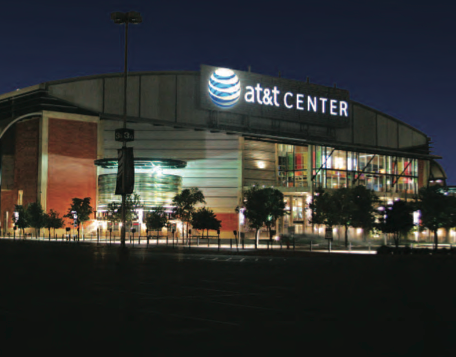
I really could have used such an informative service at the College Football Playoff championship game, which I was able to attend via a last-minute media invite from AT&T. Though my pass included access to the game (and more suite-level pampering) I didn’t have any special treatment getting to the event, so my game-day travel experience was probably very similar to many of the thousands of Ohio State and Oregon fans who had likely never been to AT&T Stadium before. Like many others, I decided to get to the stadium early, both to avoid any kind of parking crush and to bathe in whatever pre-game atmosphere might emerge. Three things I wasn’t prepared for came back to chomp me in the behind: Freezing cold weather, the lack of anywhere outside the stadium to get out of said cold weather, and the lack of any kind of online information to assist in the situation.

Fans freezing outside waiting for the CFP game to start

Fans freezing outside waiting for the CFP game to start

Though we were smart enough to grab lunch beforehand at a nearby bar and grill, my friend and media buddy Phil Harvey and I were only vaguely aware of the fact that the doors to the stadium weren’t going to open until 5:30 p.m., two hours before the scheduled game start, something we hadn’t really counted on when we drove over to park at 2 p.m. Our thoughts of being able to wander around and check out tailgate parties — or the underpublicized outdoor “festival” being put on by the NCAA and its sponsors — were negated by the chilling, biting wind, which whipped mercilessly throughout the acres of parking lots surrounding the stadium.

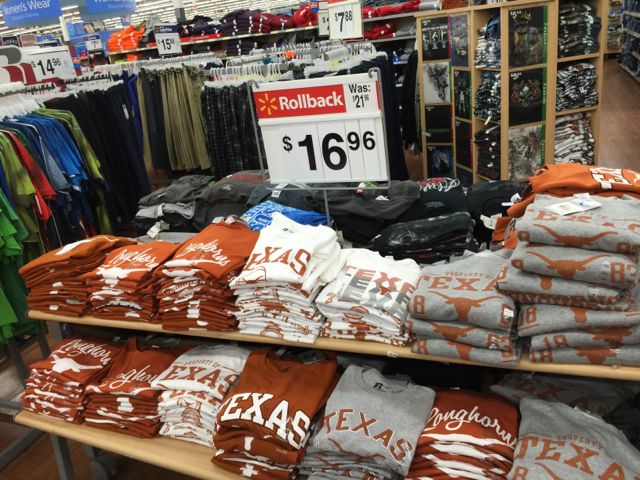
Like many others that day, we wound up spending some unplanned shopping time in the nearby Walmart, mainly to get out of the chill. We also ended up being frustrated with thousands of our newest closest friends, when the ticket gates apparently opened at 4:30 — only to find ourselves “in” the event (having gone through security and ticket checking) but still outside the doors, jammed onto the outdoor patios where we had to wait for another hour. The only good part of being crushed cheek to jowl is that being packed together did help keep all of us somewhat warmer.

Bargains available at the AT&T Stadium Walmart.

Bargains available at the AT&T Stadium Walmart.

Sure, we should have been smarter and maybe asked more questions beforehand but during the hours of unpleasantness all I could think of was why someone from the game or venue wasn’t outside watching what was going on, or doing anything to help rectify the situation. Even a simple official message of “we aren’t opening the doors for two more hours — here are a list of nearby restaurants you can walk to” would have been extremely helpful advice.

Maybe the CFP game was an outlier situation — lots of people who had never been to the venue before — but I’m guessing the situation isn’t that unique, especially for “big” events like playoffs or championships. And especially when it comes to extreme weather conditions, it just seems to make sense to have some kind of continually updated “at the game” news service that is well advertised and easily found, so that when a crisis situation emerges, fans know where to turn for trusted information.

Do any such services exist? Are there teams out there already doing this in a fashion that works? Let me know here, or we can have a discussion over on Twitter, where you can find me under the @PaulKaps handle.

NBA stadium tech reports — NBA West, Southwest Division

Editor’s note: The following team-by-team capsule reports of NBA stadium technology deployments are an excerpt from our most recent Stadium Tech Report, THE HOOPS AND HOCKEY ISSUE. To get all the capsules in one place as well as our featured reports, interviews and analysis, download your free copy of the full report today.

Reporting by Chris Gallo

NBA WEST: Southwest Division

Dallas Mavericks
American Airlines Center
Seating capacity: 19,200
Wi-Fi: Yes, (310 access points)
DAS: Yes

The Dallas Mavericks partnered with Aruba and installed over 310 Wi-Fi access points throughout American Airlines Center over the last year. The upgrades have spelled success with getting fans in their seats, as Dallas sold out their suite plans this season and plans to expand the suites in coming years. The team’s mobile app, available on iPhone and Android, has brought partnerships with services like Uber, allowing fans to enter to win free tickets and rides to the arena all season.

Houston Rockets
Toyota Center
Seating capacity: 18,043
Wi-Fi: Yes
DAS: Yes

Fresh off major upgrades over the last couple years, the Toyota Center remains ahead of most arenas when its comes to connectivity thanks to a Wi-Fi deployment from SignalShare. The Rockets offer a free mobile app, available for Apple and Android devices, with the standard features of promotions, box scores, and ticket information. No confirmation, however, that there is a Wi-Fi AP hidden in James Harden’s beard.

Memphis Grizzlies
FedExForum
Seating capacity: 18,119
Wi-Fi: Yes
DAS: Yes

FedExForum debuted fan-facing Wi-Fi a year ago, and AT&T boosted its Distributed Antenna System last March right in time to host the 2015 NCAA Tournament Sweet 16 games.

New Orleans Pelicans
Smoothie King Center
Seating capacity: 16,867
Wi-Fi: Yes
DAS: Yes

Hosting the league’s All-Star game does have its advantages, as the Smoothie King Center received a significant Wi-Fi deployment from Cisco a year ago. The renovations did not stop there. The Pelicans completed more aesthetic changes, including an expanded ticket office area, to greet fans for the home opener this past fall.

Screen Shot 2015-05-27 at 12.10.15 PMSan Antonio Spurs
AT&T Center
Seating capacity: 18,581
Wi-Fi: Yes
DAS: Yes

The Spurs and Bexar County announced a $101.5 million plan to renovate the AT&T Center. The renovations to the 12-year-old facility are slated to begin this summer, and include a boost in Wi-Fi, better seating, and a new scoreboard. The Spurs already feature mobile apps available on Apple, Android, and Windows devices to keep fans up to date.

Thinking out loud: When will stadium apps use voice commands?

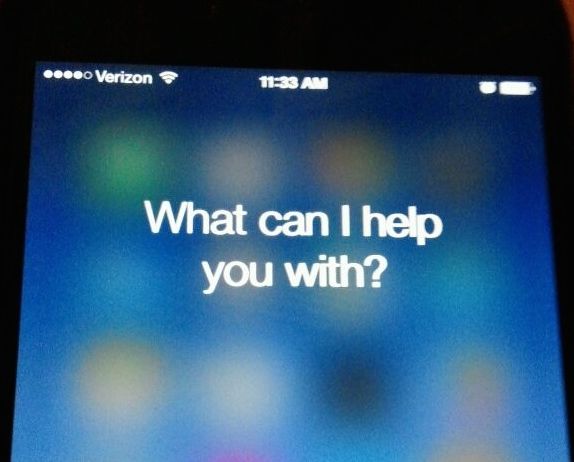
Wouldn't it be great to have a stadium app that asked this question, out loud?

Wouldn’t it be great to have a stadium app that asked this question, out loud?

In the overall world of smartphones, voice commands and help-me services like Apple’s Siri are commonplace. So when will voice commands become part of stadium apps, a place where they could be really useful?

Unfortunately, I don’t have an answer and I bet if I asked Siri I wouldn’t get a clear reply. But as the kickoff column in what is planned as a weekly “thinking out loud” feature here, maybe the reading audience can chime in: Are voice commands coming to stadium apps anytime soon? What are the sticking points? Are there technical reasons why fans can’t use voice commands to help make the game-day experience a better one?

After spending a year really pondering how technology can help the fan situation, I now understand why most stadium apps have low usage rates: They simply aren’t addressing the main pain points of attending a live event, which primarily have to do with waiting in a line, or wasting time. Sometimes that line is in the parking lot or at the public transportation station, and sometimes it’s at a concession stand. Sometimes it’s a restroom line. Wasting time not in a line usually comes from not being able to find something, or somebody. I think voice commands could help make things easier, and would provide a real reason for fans to download and use a stadium app.

Listen to me, don’t tell me

As most of us who use smartphones know, the combination of features like voice commands and a powerful app like Google Maps is drop-dead simple and extremely helpful. I’m still amazed by the fact that I can sit in my car, tell my phone “directions to xxx address,” and then the phone will talk me through the way there, so I’m not endangering myself or others by looking at a screen while driving. (Which may be the stupidest thing a living being can do.)

Siri can answer lots of things, but she can't tell you why sports apps don't have voice commands.

Siri can answer lots of things, but she can’t tell you why sports apps don’t have voice commands.

So… why can’t that functionality be a part of a stadium app? Last year while attending multiple games I noticed that sometimes trying to type things on my smartphone was near impossible, especially when you are holding a drink in one hand. I also noticed that screens were sometimes hard to read in the bright sunlight of an outdoor event. Voice commands and voice replies could go a long way to making a stadium app more useful; I’m especially thinking about it when you combine it with a powerful action feature — like the Levi’s Stadium app’s ability to let you pre-order food and drink for express pickup or delivery — wouldn’t it be great if you could just click the talk button and say, “I’d like a hot dog and a beer,” and then have the phone ask you, “pickup or delivery?”

I’ve got a lot more ideas how voice commands could help improve a game-day experience — like using it to help me find friends who I know are at the stadium — but I’m interested in your thoughts here as well. First of all, from a technology standpoint is this idea doable? Can the resources that work for Google Maps be replicated in stadiums? What’s needed — maybe more beacons or some kind of better Wi-Fi location system? Chime in here. Since this blog isn’t yet voice-enabled, you can leave comments below or shoot me an email to kaps at mobilesportsreport.com. Like Siri, I will thank you personally if you do.

In-seat food delivery returns to Levi’s Stadium for Earthquakes soccer game

Screen shot from Levi's Stadium app showing active in-seat delivery option.

Screen shot from Levi’s Stadium app showing active in-seat delivery option.

In-seat food delivery, the feature perhaps most unique to Levi’s Stadium, will return this Sunday for a MLS game between the San Jose Earthquakes and the Orlando City SC, a 4 p.m. start at the 68,500-seat home of the San Francisco 49ers.

While in-seat food delivery was active for all the Niners’ home games this past NFL season, the feature ran into some issues during the Coors Light Stadium Series hockey game at Levi’s in February, a still not-fully-explained problem of either too many orders or too few staffers to deliver that led to an unspecified number of incompleted orders and angry fans. At subsequent Levi’s events like the March WrestleMania 31 event, fans were not able to order in-seat food and beverage delivery by request of the event’s organizers.

But the latest refresh of the Levi’s Stadium app by VenueNext shows an active in-seat delivery menu, though it appears only food and beverages, and not merchandise, will be available for soccer fans to have brought to their seats. One reason why it may be easier for delivery to be available is that from seating maps it appears that the 300- and 400-level seating areas (the upper decks at Levi’s) won’t be open for the Sunday soccer game, making it a smaller overall crowd.

RootMetrics debuts tests of cell service inside stadiums

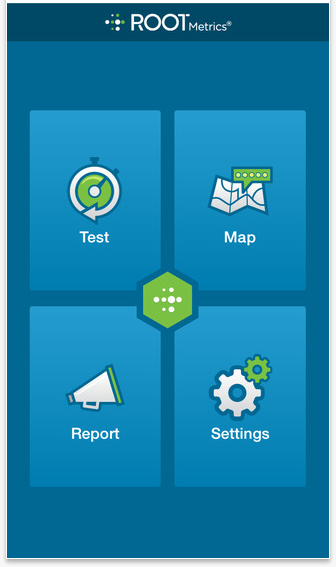
Screen shot of RootMetrics reporting app.

Screen shot of RootMetrics reporting app.

RootMetrics, a Bellevue, Wash.-based concern that has made a name for itself by conducting tests of wireless services in cities and airports across the nation, is now starting to test wireless networks in sports stadiums, which may give fans a heads-up on how their provider is performing inside stadium walls.

Though it only has visited a handful of arenas so far, RootMetrics eventually plans to test more than 100 stadiums this year, according to the company. For each venue, RootMetrics sends an unspecified number of testers to track data performance of the top four wireless carriers in the U.S., a list that includes AT&T, Verizon Wireless, Sprint and T-Mobile. RootMetrics’ venue testers also check performance of the internal Wi-Fi network if one is available, but it does not let Wi-Fi compete for its “RootScore Award,” which it bestows upon the carrier with best performance in the combined categories of speed and “data reliability,” basically a measurement of the ability to make and hold a connection during any wireless data request or action.

RootMetrics also doesn’t take into account whether or not any of the carriers has preferential deals inside a venue, which may give that provider a leg up on the competition. For its report on the Staples Center, for instance, RootMetrics gives its award to Verizon, which is not surprising to us since Verizon built both the Wi-Fi and the DAS network at the facility. But RootMetrics makes no mention of the business agreements at Staples or anywhere else, which is by design, according to the company.

Why can’t Wi-Fi win?

RootMetrics CEO Bill Moore said in a recent phone interview that such details about contracts and preferred suppliers really don’t matter to consumers — what really matters, he said, is how well each carrier performs in the venue.

While the “scoreboard” mentality does perform a service by presenting just what data the testers find, the RootMetrics venue surveys have some gaps that may need to be filled or changed in the future to present a fully accurate picture of stadium network performance. One big reporting gap is the fact that RootMetrics doesn’t use any iOS devices in its stadium tests, a strange omission since most stadium networks say they still see a majority of iPhones among the devices being used on stadium networks. RootMetrics also seems to unfairly leave Wi-Fi networks out of the scoring, even though in many cases so far the local Wi-Fi networks far outperform the carrier cellular links.

Screen shot of RootMetrics' test results for the Moda Center in Portland.

Screen shot of RootMetrics’ test results for the Moda Center in Portland.

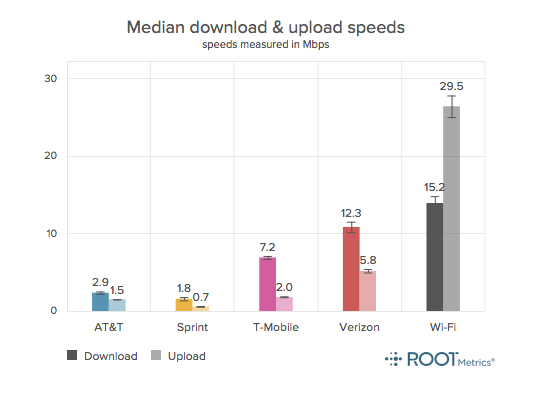
For Portland’s Moda Center, for instance, RootMetrics gives its RootScore award to Verizon, since in their testing Verizon was found to have better data reliability and better data speeds than the other cellular carriers. But the stadium’s in-house Wi-Fi network was 3 Mbps faster than Verizon on the download side and more than five times faster than Verizon on the upload side — yet Wi-Fi wasn’t mentioned in the venue “scores” and only got a footnote at the bottom of the results page.

Founded in 2008, RootMetrics has (apparently) built a good business in its chosen field, since it was acquired last month by the Englewood, Colo.-based IHS, a large information and analytics concern that recorded $546 million in revenue for its most recent quarter.

In the industry, RootMetrics is well known for its wireless coverage performance map and its “RootScores,” which attempt to determine winners and losers in the wireless service game for major U.S. metropolitan areas and the nation’s busiest airports. The basic RootMetrics premise is that they measure exactly what service levels consumers see in real life, providing an independent way for customers to evaluate services in a given area. While consumers can see the high-level results of its tests — which include both internal testing as well as data “crowdsourced” from consumers who download the RootMetrics reporting app — RootMetrics also sells its information directly to carriers and other infrastructure providers.